
Appearance
Profit & Loss Reports
Reports in the Inventory header opens a profit and loss statement for a date range you choose — an income statement for your reselling, printable and exportable.
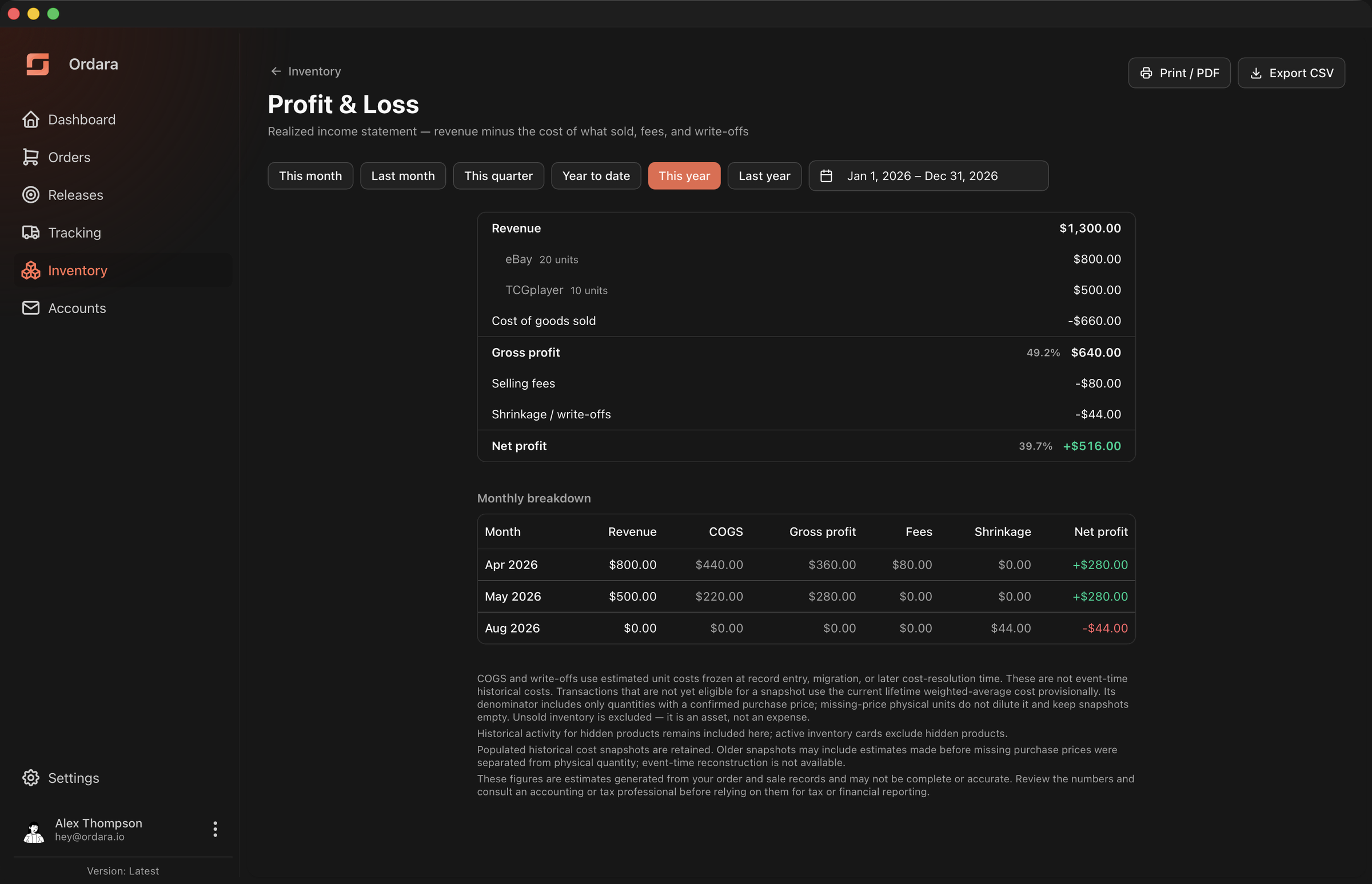
Choosing a period
Preset buttons cover This month, Last month, This quarter, Year to date, This year, and Last year. The date picker beside them takes any custom range. Both ends are inclusive, and a sale belongs to the period containing its Sold on date.
Reading the statement
| Line | Amount | Margin |
|---|---|---|
| Revenue | $1,300.00 | |
| eBay | $800.00 | 20 units |
| TCGplayer | $500.00 | 10 units |
| Cost of goods sold | −$660.00 | |
| Gross profit | $640.00 | 49.2% |
| Selling fees | −$80.00 | |
| Shrinkage / write-offs | −$44.00 | |
| Net profit | $516.00 | 39.7% |
- Revenue — everything you sold in the period, broken down by channel. Sales with no channel are grouped as Unspecified.
- Cost of goods sold (COGS) — what those units cost you, at each product's weighted-average cost. See How the Math Works for how that average is built.
- Gross profit — revenue minus COGS, with margin as a percentage of revenue.
- Selling fees — the fees attached to the period's sales.
- Shrinkage / write-offs — inventory you lost, valued at cost. Only shown when there is some.
- Net profit — gross profit minus fees minus shrinkage.
The three amber banners
Any of three warnings can appear above the statement, and they describe different problems. Each names the products it can, and all three sit inside the printed area — a statement you have printed and filed needs the caveat more than the screen does. The CSV export carries them too.
Some units are valued at $0. Units sold or written off in the period belong to a product with no recorded cost, because every order behind it was cancelled. They go in at $0.00, so if those units really did cost you something, cost of goods sold and shrinkage are understated and net profit is overstated by that unknown amount. If they genuinely were free, nothing is wrong — which is why the banner is phrased around what is unknown rather than asserting the figure is wrong.
Purchase prices are incomplete. A contributing purchase carried no per-item price, so the product's basis covers only the part Ordara knows. See Lines with no price.
Some units are valued at an incomplete cost. A cost was recorded, it just does not cover every purchase behind the units that sold, because some order lines are still in Needs review. Unlike the first, this is not one-directional: an unreviewed line cheaper than the average means COGS is too low and profit too high, a dearer one the opposite. Clearing the queue settles it.
When your sales and write-offs fall in more than one month, a monthly breakdown table appears beneath the statement — visible in the screenshot above — showing the trend. A range spanning several months with all its activity in one of them still shows a single statement.
It lists Month, Revenue, COGS, Gross profit, Fees, and Net profit, one row per month with activity — plus a Shrinkage column when there is any. The CSV export uses the same names in the same order, with one difference: it always writes the Shrinkage column, even for a period with no write-offs, where the screen leaves it out.
The accounting model
The statement is realized: it reports the profit recognized from the sales and write-offs that happened in the period, and nothing else. "Realized" is about when a transaction belongs here, not whether the figure is final — a statement carrying any amber banner still has units valued at a cost that can move.
Revenue is recognized on the sale date. Not when the money landed in your account — if you sold on March 30 and were paid on April 3, it is March revenue.
Cost is matched to what sold. Only the units that sold in the period are expensed. This is the difference between a profit and loss statement and your bank balance.
Buying stock is not a loss
Unsold inventory never appears on this statement. Spending $2,200 on stock you still hold has not cost you anything yet — you converted cash into an asset of the same value. It becomes an expense only when the units sell, as cost of goods sold.
That is why the two pictures can point in opposite directions for the same month. Say you spend $2,200 restocking in March and sell nothing: your bank balance is down $2,200, but March's statement shows $0 cost of goods sold and $0 profit — not a $2,200 loss. Both numbers are right; they answer different questions. This statement answers "did I make money on what I sold". Your bank balance answers "do I have more or less cash than I started with".
Write-offs are an expense. Inventory recorded as damaged, lost or stolen, or written off for another reason is charged against profit at its cost, in the period you recorded the adjustment.
Two reasons are not. A count correction fixes a bad number in your records rather than reporting a real loss. Personal use is stock you withdrew for yourself — a draw against the business rather than a business expense. Both still adjust your on-hand count; neither reaches this statement.
Costs freeze as soon as Ordara can value the transaction
COGS and shrinkage use the unit cost frozen onto each sale and write-off — normally as you record it — so restocking at a different price no longer moves a period you have already reviewed.
Two things to know about what that figure is. It is the product's weighted average at the time it was frozen, not the price you paid for those particular units — Ordara does not reconstruct historical cost. And a transaction Ordara could not value yet, because the product had no cost basis or had lines awaiting review, stays provisional and is still valued at the current average until it qualifies. The amber banners above are what tell you provisional transactions are in play. The statement footnotes all of this on screen. See Accuracy & Limitations.
Export a copy while a period is still provisional
A statement with no amber banner is settled and will not move on you. If any are showing, some of the figures are still provisional — export the CSV then rather than waiting.
Hidden products still count here
Hiding a product removes it from active inventory and the inventory CSV, but its history stays on this statement — hiding is a housekeeping action, not a way to restate the past. Warnings name hidden products with a (hidden) suffix.
Print and export
- Print / PDF prints the statement alone — no sidebar or app chrome — so you can save it as a PDF. What you print is always tied to the range that produced it: while a newly chosen range is still loading, the figures on screen stay labelled with the range they actually belong to, and printing is held back until they match. A statement that failed to load cannot be printed at all, rather than printing a blank one under a heading that looks authoritative.
- Export CSV writes the monthly breakdown with a total row, then the channel breakdown, for spreadsheet work. See Exporting.
When a period is empty
A range with no sales and no write-offs shows "No sales or write-offs in this period" rather than a statement of zeros.